Using Native Mobile Device Features from Visualforce with Phonegap
The prospect of learning hybrid mobile development is daunting for most Salesforce developers. There are just so many new things to learn all at once. And so, whilst recently learning Phonegap, Ionic, Angular and responsive-design for a side project I realised that there is a very simple bridging approach that can teach you some of the basics and that might even result in some cool apps. This bridging is achieved by making the native features of a mobile device (GPS, local storage, camera etc.) directly accessible from Visualforce.
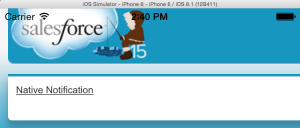
It is dead easy. I swear. And will demystify the hybrid development paradigm for you.
Set up Phonegap
Install Phonegap and Set up an empty project
For this post I’m assuming you know that Phonegap is a framework that allows you to build web applications that are then bundled into native containers (and iOS container for Apple devices, and Android Container for Android devices etc.). The cool part is that Phonegap provides a JavaScript library to include in your web app and this library provides the link between your app and the native features of the device.
Note: “Cordova” and “Phonegap” are often used interchangeably, at this point it is not important to consider the difference between the two. You will even notice that the `cordova` command can often be substituted for the `phonegap` command (and vice versa) in the official documentation. Don’t panic.
The image below depicts this in a scary but clear way (don’t panic).
Anyway, all you need to do at this stage is to:
- Install Phonegap as per the instructions and,
- Set up a blank project (RTFM, but ignore the last command ‘phonegap run android’).
Setup Native Feature Access
Phonegap has the notion of “plugins” which provide your project with special capabilities. In this case we’re going to trigger the native notification capability of our mobile device from Visualforce so you’ll need to add this plugin to your project.
phonegap plugin add org.apache.cordova.dialogs
Build your Project and Pilfer the JavaScript
Next you’ll need to build the Phonegap project. This action takes your webapp (which you haven’t customised at all yet), creates the native code for the target platform you choose (iOS in this case) and smashes them together. It also generates the JS proxy libraries that will be used to access the device’s native features. We want these. We want them real bad.
1. First step is to build (you only do this once for each project):
phonegap platform add ios
phonegap build ios
You can now test that everythings built correctly by running the iOS emulator.
phonegap emulate ios
2. Once you’ve confirmed that the app can run, it’s time to steal that JS.
If you navigate through to: [your project name] > platforms > ios > www, you will need to zip/archive three items:
- cordova_plugins.js
- cordova.js
- plugins (which is a folder)
Collectively these are required to access the device features from JavaScript (reminder: Don’t Panic). Keep this zip-file safe because you’re going to upload it as a static resource later on.
Create or Modify Your Salesforce Project
- Set up a new Developer Environment, or just sign into one you’ve previously set up.
- Upload the previously archived files as a static resource. I’ve called mine “Cordova”.
- Next, create a new blank Visualforce page. It doesn’t need to have a controller. I’ve called mine “Hybrid”.
- Add the “cordova.js” library to the page. Note that you don’t need to include all of the other JS libraries in the file because the main library file will load all the others.
<script type="text/javascript" src="{!URLFOR($Resource.cordova, 'cordova.js')}" />
5. Next, add the following code. The first bit (the JavaScript) waits for the cordova library to finish loading (‘deviceready’) and then overrides the default JavaScript “alert” functionality with the appropriate native notification functionality. The outputlink following that triggers a JavaScript alert() so that we can test this functionality.
<script>

  document.addEventListener('deviceready', function () {

    if (navigator.notification) { // Override default HTML alert with native dialog

        window.alert = function (message) {

            navigator.notification.alert(

                message,    // message

                null,       // callback

                "Native Dialog", // title

                'OK'        // buttonName

            );

        };

    }

  }, false);

</script>

<apex:outputLink value="#" onclick="alert('Hello');">Native Notification</apex:outputLink>
6. Nearly done! Now all you need to do is set up a Force.com Site and make your new page accessible from that site. If you’ve never done this before never fear, it’s very easy and shouldn’t take more than 5 minutes.
Take note of the Force.com Site URL that can be used to access your page directly. You’ll need this in the next step.
Point your Phonegap project to your Force.com Site page
1. You’ll find a file called “config.xml” in the root of your Phonegap project. Within this file is a line that reads:
<content src="index.html" />
2. Change the value of the “src” attribute to be the Force.com Site URL for your new page. Save this file and then build the Phonegap project once again.
phonegap build ios
3. Once that’s done, launch the emulator.
phonegap emulate ios
Win at Life
You’ll be presented with a non-mobile looking Visualforce page within the emulator window. If you click the link within this window you won’t get a native JavaScript alert() but instead a native notification! Well done, you are now a mobile developer!!1!one!!
This is certainly a very simple example, but all other native features of the mobile device are accessible in a very similar way. I invite you to explore these capabilities more, let me know how you get on.
Repositories
A Beginner’s Guide to Object-Oriented Programming with Apex: 3. Polymorphism
This is part 3 in the series “A Beginner’s Guide to Object-Oriented Programming with Apex” and will cover the aspect of Polymorphism. For other posts in this series see the links below.

A Beginner’s Guide to Object-Oriented Programming with Apex
- Introduction
- Encapsulation
- Abstraction
- Polymorphism (this post)
What the hell is Polymorphism?
Polymorphism has the funkiest name and is my favourite aspect of OOP. If done correctly you will feel like a proper genius.
Originating from Greek words, polymorphism more or less means “many forms”. This gives away very little unless you know polymorphism quite well but essentially polymorphism describes the ability of a type e.g. a set of differing Apex classes, to be used in similar ways without knowing much about those classes. An immediate example on the platform is the Type.format() static method available on Integers, DateTime, etc**. Although each of the Types represents something different this method does a similar thing for each i.e. turns them into a String but does this in a different way for each type. Which brings me to a definition of Polymorphism:
Polymorphism describes a pattern in object-oriented programming in which classes have different functionality while sharing a common interface.
Let’s take this academic statement and make it more concrete by looking at an example.
**I’ve assumed that these “primitives” are subclasses of a shared superclass or implementations of a shared interface.
How do we implement Polymorphism?
Polymorphism in Apex requires an Apex Interface to be implemented or Class that can be extended by other Apex classes e.g. Virtual or Abstract classes. The implementing or extending classes can then be used in a predictable, consistent way even though their types are different from one another. Time for an example.
Imagine that we need to display the original price and discounted price for a set of completely different products. We want to use a single Visualforce table to do this and with the bare minimum of VF code whilst modelling these products in a reusable and extensible way. We start off by defining an interface like so:
public interface Product {
  /**

    Any class that implements this interface must

    have methods with the following signatures

  **/

  Decimal getDiscount();

  Decimal getPrice();

  String getName();

}
Any class that implements this interface has to implement methods that match the two method signatures that have been defined.
Now we create two categories of products, one for fruit and the other for finance.
/** Fruit Products Class **/

public with sharing class FruitProduct implements Product {

  private final Decimal discountedRate = 0.85;

  private Decimal price;

  private String name;

  // The Constructor

  public FruitProduct(String name, Decimal price) {

    this.price = price;

    this.name = name;

  }

  // Price method implemented due to contract set by interface

  public Decimal getPrice() {

    return price;

  }

  // Discount method implemented due to contract set by interface

  public Decimal getDiscount() {

    return price * discountedRate;

  }

  // Method to retrieve product name

  public String getName() {

    return name;

  }

}

/** Financial Products Class **/

public with sharing class FinancialProduct Implements Product {

  private final Decimal discountedRate = 0.45;
  private final Integer hiddenCost = 100;
  private Decimal price;

  private String name;
  // The Constructor

  public FinancialProduct(String name, Decimal price) {

    this.price = price;

    this.name = name;

  }

  // Price method implemented due to contract set by interface

  public Decimal getPrice() {

    return price;

  }

  // Discount method implemented due to contract set by interface

  public Decimal getDiscount() {

    return (price + hiddenCost) * discountedRate;

  }

  // Method to retrieve product name

  public String getName() {

    return name;

  }

}
Notice that these classes both implement the same interface and therefore some of their methods have the same signatures. However the calculation of the discount is different in each class! As the author of these classes the inner workings of the getDiscount methods could do anything that you can imagine – they could use other classes and methods, make web service callouts etc. without impacting their intended polymorphic behaviour.
But how will we use two different types of Apex class in one VF table? The answer is in their Polymorphic capabilities! So how can we apply this? Let’s start with the page.
<apex:page controller="ProductController">
  <apex:pageBlock>
    <apex:pageBlockSection>
      <apex:pageBlockTable value="{!allProducts}" var="p">
        <apex:column>
          <apex:facet name="header">Product Name</apex:facet>
          <apex:outputText value="{!p.name}" />
        </apex:column>
        <apex:column>
          <apex:facet name="header">Price</apex:facet>
          <apex:outputText value="£{!p.price}" />
        </apex:column>
        <apex:column>
          <apex:facet name="header">Discounted Price</apex:facet>
          <apex:outputText value="£{!p.discount}" />
        </apex:column>
      </apex:pageBlockTable>
    </apex:pageBlockSection>
  </apex:pageBlock>
</apex:page>
Notice how we only iterate over a single list! Let’s see how this is done in the controller.
public with sharing class ProductController {
  // This list can hold any product that implements the Product interface
  public List<Product> allProducts{get;set;}

  public ProductController() {
    allProducts = new List<Product>();

    // Instantiate some fruit and financial products
    FruitProduct banana = new FruitProduct('Banana', 1);
    FruitProduct dragonFruit = new FruitProduct('Dragon Fruit', 2.50);

    FinancialProduct mortgage = new FinancialProduct('Mortgage', 100);
    FinancialProduct spreadBet = new FinancialProduct('Spread Bet', 5);

    // And add them to the list
    allProducts.add(banana);
    allProducts.add(dragonFruit);
    allProducts.add(mortgage);
    allProducts.add(spreadBet);
  }
}

Looking inside the controller we see that the list allProducts is of type Product which isn’t a class but an interface. By doing this we are saying, “create a list that is able to contain any instantiated Apex class that implements the Product interface” i.e. the list can hold any Financial or Fruit Product, or in fact any other class that might later be created that implements this interface. The cool thing is that our Visualforce page (or developer) doesn’t have to know the exact type of class that’s being passed, all it knows is that a particular method will be available for it to call. This is very powerful and is a common use for polymorphism.
Another common use is within ISV applications that need to be extensible. Such an application might provide several interfaces that an external person/company could implement to extend the application’s functionality. For example, the application may have a set of interfaces that describe a particular way of creating classes that allow the external party to implement a custom outbound (from SFDC) integration from within the app. This way the creators of the ISV app don’t have to code every conceivable integration into their app but instead allow others the ability to do this without exposing the inner workings of their app to the world!
Why Should I Use Polymorphism?
Polymorphism is amazingly powerful once you’ve got the hang of it. It requires you to plan your application in a fair amount of detail and results in code that is loosely coupled, easy to extend, faster to write and generally more robust. As if that wasn’t enough it also makes you feel really smart!
This concludes the series on object-oriented programming and I’m sure that I’ve raised more questions than provided answers. The topic is huge and I encourage you to grab a book on OOP because it is key to becoming an expert software developer no matter which language you use.
If you’d like a bit more info on the topic of OOP and are around for DF14 look out for my talk where I’ll work through an example of applying OOP to code when connecting to external APIs.
A Beginner’s Guide to Object-Oriented Programming with Apex: 2. Abstraction
This is part 3 in the series “A Beginner’s Guide to Object-Oriented Programming with Apex” and will cover the aspect of Abstraction. For other posts in this series see the links below.

A Beginner’s Guide to Object-Oriented Programming with Apex
- Introduction
- Encapsulation
- Abstraction (this post)
- Polymorphism
What the hell is Abstraction?
Abstraction is a very interesting and surprisingly simple concept. At its core it’s about context and if Abstraction were a company it’s motto would be “Provide the right tools and data at the right time.”. There are many analogies in the “real world” e.g.
- The Force.com Platform is an abstraction of the complex, underlying hardware and software that provides us with a simplified set of tools that can achieve the same level of benefit as those complex, underlying hardware and software!
- A technical architect and developer both experience the creation of software but the developer’s perspective is far more detailed and requires different knowledge and tools. A technical architect has a different perspective and usually is not interested in the same information and tools that the developer needs. The detail of the developer’s work is abstracted from the technical architect although they will have a higher-level understanding of the same applications.
- The driver of the car has a very different perspective (interface, information, goals, tools) than the engineer of the same car. Imagine if you had to know how all the parts of a car work together in order to drive! Those details are abstracted from the driver.
Where is this applicable to developers on the platform? Ever created a Visualforce component or Apex utility class? Well you my friend you are already using abstraction!
This sounds a lot like Encapsulation!
Abstraction and Encapsulation go hand in hand but they are different. Encapsulation is one of the ways you can achieve abstraction but does not encompass the entire concept. As stated previously Encapsulation is about hiding data and logic-implementations whereas Abstraction is described as providing the appropriate perspective to the appropriate consumer.
How do we Abstract?
There is a lot that is already abstracted on the platform e.g.
- The declarative features of the platform abstract the complexity that you would have to employ in order to replicate them through code.
- The mechanisms for CRUD access to data are abstracted through SObjects (using a technique called ORM) in order to simplify this access.
- Apex and Visualforce give you the ability to encapsulate and abstract complexity and expose this to consumers (other code and/orwebservices) through simplified interfaces.
- These abstractions can be very sophisticated as has been shown several times on Andy Fawcett’s blog e.g. the domain, selector and service layer patterns in this repo provide patterns that allow the implementor to create simple mechanisms to connect and exercise complex logic. Those that use this logic need not be aware of the complexity contained beneath.
So how do you use abstraction? This is a topic that could take a year at University to teach but let me provide two examples, one simple and another more complex.
1. Simple Example
Calculating the area of a circle requires some specialised knowledge so you may want to create an abstraction of this calculation i.e. give other developers a way to calculate the area of a circle without having to know the actual calculation.
public Double calculateArea( Integer radius ) {

  return (radius)*(radius)*(Math.acos(-1)); // Pi = Math.acos(-1)

}
Obviously this is a very simple example but you could imagine a public method that is a lot more complex and whose inner workings you don’t really care to know too much about!
Note that this could also be used as an example of encapsulation! The difference however is that when considering this code as:
- Encapsulation ~ we are hiding the implementation.
- Abstraction ~ we are providing the appropriately simplified interface in order to access this functionality.
A subtle but important difference.
2. Complex Example
The complex examples considers a potential design pattern for your Apex code.
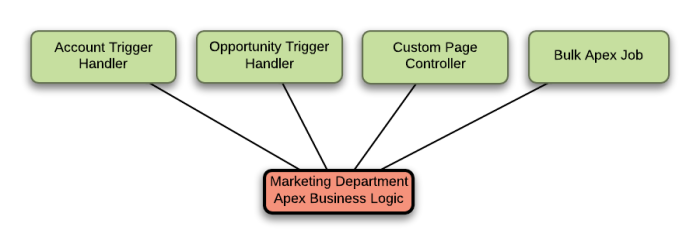
This example works at a higher level of abstraction than the previous one (pretty meta huh?) but the concept is similar. A developer creates a class (or set of classes) that contain all of complex business logic for the marketing department (this might be called your Service Layer if you were layering your application logic). This logic is then consumed by several other platform components such as trigger handlers, page controllers and bulk apex classes. The class methods and properties expose simplified interfaces to this logic and the details of the logic are abstracted from the consumers.
The benefit of abstraction here is that (in theory) you don’t need understand the details of the logic within the business logic classes you just need to understand their general purpose, know the method signature for the appropriate method and if necessary pass it the right data to get the expect result. And
Why Should I Use Abstraction?
If you’re a developer – much as with Encapsulation – you’ve probably been using Abstraction without even knowing it. The benefits are that by employing abstraction you’re making things easier for you and your team by presenting only the relevant information and tools at the appropriate time. This means a less confusing world, so less time is spent comprehending an application, fewer errors are made and everyone is happier.
Next time I’ll talk about my favourite part of these OOP principles, Polymorphism. It’s more than just a fun word to say!
A Beginner’s Guide to Object-Oriented Programming with Apex: 1. Encapsulation
This is part 2 in the series “A Beginner’s Guide to Object-Oriented Programming with Apex” and will cover the aspect of Encapsulation.

A Beginner’s Guide to Object-Oriented Programming with Apex
- Introduction
- Encapsulation (this post)
- Abstraction
- Polymorphism
What the hell is Encapsulation?
Encapsulation isn’t a tricky concept in itself but some confusion does arise from it’s close relationship with Abstraction (to be covered in my next post). Broadly it is defined as one of, or both of the following:
- An information hiding mechanism.
- A bundling of data and methods that operate on that data.
These are pretty abstract statements but in reality are very simple. I will demystify them with examples below but for now let’s use an analogy:
Imagine you have a watch (or if you have one just consider it, don’t worry about the imagining part) that tells you the date and time. You can adjust the date and time using buttons/knobs/switches but you have no idea what happens inside the watch, just that it results in the date and time changing. You have some data (the date and time), you have some methods to operate on that data (buttons/knobs/switches) and there is a whole lot of stuff going on in the background that you don’t know about (and it’s better that way, imagine you had to adjust all those bits and pieces yourself).
That’s encapsulation baby! Read the rest of this entry »
A Beginner’s Guide to Object-Oriented Programming with Apex: 0. An Introduction
Apex has come a long way in the past few years, and as Salesforce has grown so has the number of super smart people working on the platform. There are lots of guides on how to do fancy things using JavaScript, Apex and Visualforce as well as many more whitepapers on the topics of governances and standards. However I think there is a gap, and I’d like to plug it.
Over the next few weeks and months I will be releasing articles that describe and show the basics of object-oriented programming (OOP) with Apex. My approach will be to make these articles as modular and simple as possible. The target audience? Developers with a-teeny-bit-of-experience through to those who have tons of experience but never had any formal training in OOP.
A Beginner’s Guide to Object-Oriented Programming with Apex
- Introduction (this post)
- Encapsulation
- Abstraction
- Polymorphism
What the hell is OOP?
Good question, and although many agree on some elements of OOP there is still a divergent view in the details. Contrasting it to what came before helps though.
The programming paradigm prior to OOP essentially had everyone writing code as your would an essay i.e. a single long text with one line written (and executed) after the other. There were no classes, no methods, no GOTO statements even (if you go far back enough that is). If you needed the same complex calculation in 5 parts of your application you had to write it 5 times. This is obviously a bad idea and over time the geniuses that created computer programming started inventing bits and pieces of engineering to make it easier to create, maintain and extend their code. Collectively, these features together with their experience were the beginnings of OOP.
The most commonly cited features of OOP are described below.
Encapsulation
A way to hide state (or private data), but also – confusingly – a way to bundle data and capabilities to operate on that data.
As an example consider a sausage making machine, you pour some stuff into one end and get sausages out of the other without needing to know the internal workings. The inner workings are encapsulated within the machine.
Abstraction
This is one of the trickiest concepts because it is relative, you can have levels of abstraction and it essentially means providing the appropriate level of information and data at the requested level.
With my previous example, if you are the sausage maker then you just need to know what stuff to insert into which part of the machine. But, if you were the sausage machine repair man you would need to have the tools, knowledge and access to all the bits and bobs inside of the machine. These are different levels of abstraction.
Inheritance
A controversial aspect since some languages think that inheritance is bad. In short it is the capability of a class or object to have certain methods and attributes passed down to them through a hierarchy.
Now that I’ve started the sausage story I can’t stop! All sausages share certain qualities e.g. they’re all encased in something, have some type of contents and (usually) need to be cooked before being eaten. You could represent these common attributes in a parent class and have specific types of sausages (pork, chicken, blood pudding) “subclass this superclass” i.e. inherit from it.
Polymorphism
Polymorphism is extremely rewarding when you get it right because it just feels smart. In short it allows you to define ways of dealing with data without knowing exactly how that data will be defined in the future.
To finish off the sausage story (anyone else hungry?) you could put any type of meat into the machine but in the end you will still always get a sausage i.e. provided that a certain type of input (any type of meat and spice) is provided to the machine it “knows” what to do with it (make delicious sausages) even though the types of sausages may have differences.
Don’t worry if these concepts haven’t clicked just yet, each will be covered in detail in future posts.
These concepts are obviously academic and language agnostic but Apex makes them available to you through the constructs of classes, methods and attributes of those classes, instances of those classes.
A note on terminology. In the Salesforce world an Object is most commonly used to refer to a data entity e.g. Account or CustomObject__c. In the OOP paradigm an Object is an instance of a Class i.e. MyClass.cls is an Apex class which provides the blueprint for instances of itself. This becomes clearer with an example:
MyClass myObject = new MyClass();

myObject.divideByZero();
MyClass is the class, and myObject is an instance of that class AKA an object. Got it? Great.
Why Should I Use OOP?
Because it will make you a better programmer and it doesn’t hurt with the ladies/men (delete as appropriate). Your code will be better, you will end up doing less boring work and it will be easier (and quicker) to fix bugs. I guarantee it.
Next Time on Th3Silverlining
My next post will delve into the feature called Encapsulation so hit the subscribe button to find out when it’s published. See y’all then.
Salesforce: Universal Batch Scheduling Class
 I’d like to propose a new way of working with scheduled batch classes. I’ve worked on several hundred Salesforce projects in the past few years and often see batch scheduling classes being created per scheduling requirement and it grinds my OCD – not in a good way. In most cases you should only need one “Batch Scheduler” per Org, let me demonstrate how and why.
The Universal Batch Scheduler™
Requirements
Let’s assuming you have a batch class that you need to run on a repeated schedule*, such a class signature is given below. That class will have to obey some conventions such as implementing the Batchable interface as shown in the standard documentation.
global class MyBatch implements Database.Batchable<SObject> {

// …

}
* For one off, schedule execution of batch classes you can use the System.ScheduleBatch() method.
The Scheduler
Now you might be tempted to created a scheduled Apex class specifically for this batch class, but by using the principle of polymorphism you could create a universal scheduler instead.
First of all you’ll need to implement the required interface for scheduled Apex classes as shown below.
global class BatchScheduler implements Schedulable {

// …

}
Next assign global, class-level variables which will be used to access the parameter values required when executing a batch class. Note that we’re creating a variable called “batchClass” whose type is the interface Database.Batchable. This means that any class that implements this interface can be assigned to this variable, this behaviour is called polymorphism.
  global Database.Batchable<SObject> batchClass{get;set;}
  global Integer batchSize{get;set;} {batchSize = 200;}
And finally implement the method required by the Scheduleable interface and use the variables to kick off the execution of a batch class.
  global void execute(SchedulableContext sc) {
   database.executebatch(batchClass, batchSize);
  }
Et voila! You now have a class that can be used to schedule any batch class in your Org. The final code being:
global class BatchScheduler implements Schedulable {
  global Database.Batchable<SObject> batchClass{get;set;}
  global Integer batchSize{get;set;} {batchSize = 200;}

  global void execute(SchedulableContext sc) {
   database.executebatch(batchClass, batchSize);
  }
}
In order to use it you would have to initiate the schedule from an anonymous block (Developer Console, Eclipse, Mavensmate etc.). For example I would schedule my batch class using something like this:
// Instantiate the batch class
MyBatch myBatch = new MyBatch();

// Instantiate the scheduler
BatchScheduler scheduler = new BatchScheduler();

// Assign the batch class to the variable within the scheduler
scheduler.batchClass = myBatch;

// Run every day at 1pm
String sch = '0 0 13 * * ?';

System.schedule('MyBatch - Everyday at 1pm', sch, scheduler);
There may be cases where the universal batch scheduler is not appropriate i.e. special pre-work has to be done in the scheduling class, but in most cases I’ve seen it’ll do the job. Hopefully this’ll help you make your Orgs a little neater too.
If This Then Salesforce
I’ve been enjoying IFTTT for a while now and if you haven’t experimented with it yet then I’m not sure we’ll ever be friends. Essentially it’s a very easy tool that lets you set triggers on a source API e.g. Foursquare and have some information from that API be posted to a target API e.g. Jawbone Up. IFTTT calls these recipes and I’d like to demonstrate some particularly delicious combinations that can be used with Chatter.
Salesforce Org Alerts and Known Issue posted to Chatter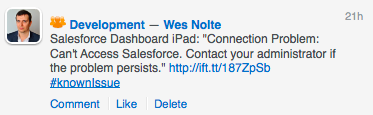
Salesforce makes Instance Alerts e.g. “Perfomance degradation on EU0.” available through an RSS feed so all you need to do is create a recipe (or copy mine) that monitors the appropriate RSS url for changes and posts to a particular Chatter group.
You can do a similar thing with Salesforce Known Issues.
Tweets posted to Chatter
Quite often there are interesting tweets that I want to share with a particular group on Chatter. One of the recipes I’ve created in this class uses the hashtag #tqcd to push a particular tweet to our “Development” Chatter group.
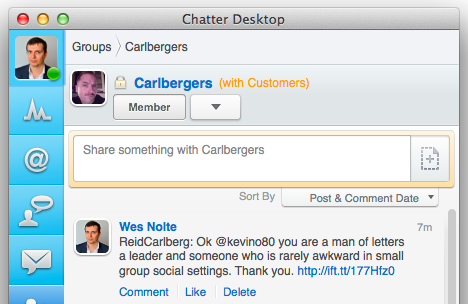 We also have more than a few Reid Carlberg fans in Tquila so we have a recipe that shares his tweets to a dedicated group in our Org. His tweets are mostly about facial hair at the moment but who am I to judge genius.
Limitations
At this point Chatter can only be used as a target system in any recipe but I’m hoping they’ll change that in future.
Best Practices
So far I’ve established two guidelines:
- Create a separate Chatter group for recipes that will be executed often. This gives people the option to opt-out of those posts.
- If possible create a separate Salesforce user to post on Chatter. This will reduce the number of explicit posts you making it easier for others to find information in your feed.
You can find all these recipes on my IFTT profile. There are quite a few other interesting recipes regarding Salesforce on the IFTTT website but I’m hoping that you’ll be inspired to think of new creative ways to use the tool. If you do please let me know in a comment below or on Twitter.
Salesforce Analytics API Sample Code
 A picture is worth a thousand words, so goes the justification for graphic novels. I kid, I love the hell out of graphic novels but now I’ve been sidetracked and this is only the second sentence of this post.
So, the Analytics API. I’m pretty enamoured with it as it seems is Pat Patterson, and I think that it’s one of the most useful features the platform has ever made available. Presenting the right chart (or set of charts) to a manager or executive can empower them to make business decision in minutes, powerful stuff. To that end myself and a few of my fellow Tquilites have begun building an opensource library of Analytics API demos to aid you in aiding your clients/managers/execs.
Below I’ve included a few introductory steps to help you get started. To start with you’ll need the code from github.
Step 0
I’ll be stepping through the Google Charts Stacked Bar Chart example from github so you’ll be able to test this out yourself.
Step 1 – Create a report
Certain report formats map well to certain chart formats so make sure you choose the right type of report. For example, stacked bar charts map well to matrix reports, summary charts map well to pie charts.
Once you have created your report and have some interesting data, determine the report ID and keep it somewhere safe. Report IDs always start with “00O”.
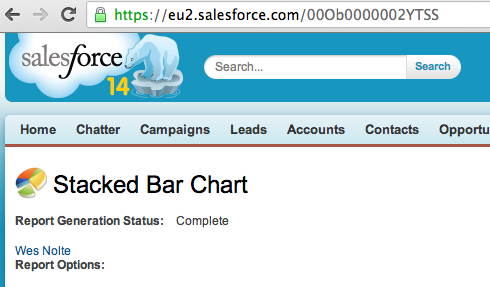
Step 2 – Create a Visualforce Page
As it says in the heading of this section, create a new VF page. Easy peasy lemon squeezy.
Step 3 – Include the chosen JS library
As with any web-based language you’ll need to include the JS library that you want to use. I’m going to use Google Charts in this example. Note I’m also using jQuery to make the AJAX callout.
 <script type=”text/javascript” src="https://ajax.googleapis.com/ajax/libs/jquery/1.10.2/jquery.min.js"></script>
 <script type="text/javascript" src="https://www.google.com/jsapi"></script>
Step 4 – Call the Analytics API
The API call can be made server-side or client-side, with this example making use of a client-side call.
    /** Fetch the JSON data representing the the report **/
    var jsonData = JSON.parse($.ajax({
        beforeSend: function(xhr) {
          xhr.setRequestHeader('Authorization', 'Bearer {!$Api.Session_ID}');
        },
        /** You'll need a URL parameter key called "id" that has a Summary Report id value **/
        url: "/services/data/v29.0/analytics/reports/{!$CurrentPage.parameters.id}",
        dataType:"json",
        async: false
        }).responseText);
The results of the callout are fed into the callback function and available through the variables “ai” and “ae” (see below).
Step 5 – Parse the resulting JSON & build the required data structure
The structure of the JSON depends on the report type but is fairly simple to understand. Be sure to use console.log() to investigate what’s going on if you get stuck.
    var chartData = new google.visualization.DataTable();

    chartData.addColumn('string', 'Stage');

    $.each(jsonData.groupingsDown.groupings, function(di, de) {
      chartData.addColumn('number', de.label);
    });

    $.each(jsonData.groupingsAcross.groupings, function(ai, ae) {
      var values = [];
      values.push(ae.label);

      $.each(jsonData.groupingsDown.groupings, function(di, de) {

        values.push(jsonData.factMap[de.key+"!"+ae.key].aggregates[0].value);
      });

      chartData.addRow(values);
    });
Step 6 – Generate the chart
Finally invoke the drawing of the chart along with any options required.
    var options = {
      title: jsonData.attributes.reportName,
      vAxis: {title: jsonData.reportMetadata.groupingsAcross[0].name},
      isStacked: true
    };

    var chart = new google.visualization.ColumnChart(document.getElementById('chart'));
    chart.draw(chartData, options);
Voila! You now know the basics of building custom charts in Visualforce (or any other web language) using the Analytics API. To try this out log into your Org and then browse to:
http://[your salesforce instance]/apex/YourPage?id=[reportId]
Feel free to use this code anyway that you can imagine and we’d be over the moon if you contribute your own awesome to what we’re building. Fork us on github.
Developing Chrome Extensions for Salesforce
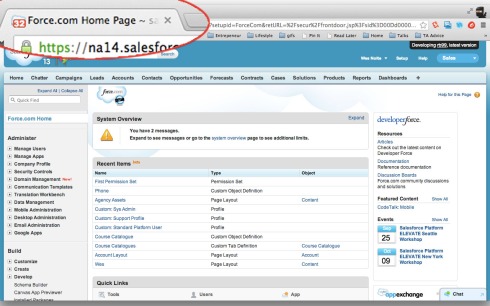 Chrome extensions are awesome, they provide amazing convenience that is limited only by your imagination. There are some amazing Chrome Extensions for Salesforce already, some of my favourites being:
As a great fan of JavaScript I’ve always wanted to create a Chrome Extension for Salesforce and I’ve finally gotten around to it. The hardest part was figuring out what context the JS executes in (e.g. in the current tabs context, or in some separate context). Let me step through the code to show you how it’s done.
Chrome Extension Structure
A Chrome Extension is made up of a JavaScript, HTML, images and JSON. At its core is a manifest file which contains the metadata describing your application in JSON. There is a lot of documentation about the structure of this file but some of the key elements are shown below.
{
  "name": "Get off my case!",
  "version": "0.8.1",
  "description": "Presents a notification above the favicon with the number of cases assigned to the current user.",
  "manifest_version": 2,
  "icons" : {
               "16": "img/icons/16.png",
               "48": "img/icons/48.png",
               "128": "img/icons/128.png"
             },
  "permissions": [ "tabs", "https://*.force.com/*", "https://*.salesforce.com/*"],
  "update_url": "https://clients2.google.com/service/update2/crx",
  "author": "Wesley Nolte",
  "browser_action": {
     "default_icon": "img/tquila_lozenge.png"
  },
  "content_scripts": [ {
     "js": [  "js/jquery.js",
              "js/forcetk.js",
              "js/tinycon.js",
              "js/contentscript.js" ],
     "matches": [ "https://*.salesforce.com/*", "https://*.force.com/*" ]
  }]
}
This file references all external resources (JavaScript, images etc.), the important parts here being the JavaScript i.e. jquery.js, forcetk.js, tinycon.js and contentscript.js. In short these files represent:
- jquery.js – the jQuery library
- forcetk.js – the JavaScript wrapper for the Salesforce.com REST API, but with one modification i.e. the ability to fetch info about the current user
- tinycon.js – a small library used to create the notification on the tab
- contentscript.js – the JavaScript file that brings them all together
The JavaScript
The first 3 JavaScript files are libraries that great, but aren’t particularly interesting in the context of this tutorial. The last file is where the magic happens, the code is listed below.
/* Get the cookie values om nom nom */
function getValueFromCookie(b) {
    var a, c, d, e = document.cookie.split(";");
    for (a = 0; a < e.length; a++)
        if (c = e[a].substr(0, e[a].indexOf("=")), d = e[a].substr(e[a].indexOf("=") + 1), c = c.replace(/^\s+|\s+$/g, ""), c == b) return unescape(d)
}

/* Encapsulating code instead of just letting it lay about */
function init() {
	// Get an instance of the REST API client and set the session ID
	var client = new forcetk.Client();
	client.setSessionToken(getValueFromCookie("sid"));

	// Retrieve the data representing the current user
	client.currentUser(function(response){
		var user = response;

		// Find cases that belong to the current user
		client.query("SELECT COUNT() FROM Case WHERE ownerId = '{0}'".replace("{0}",user.id), function(response){
			Tinycon.setBubble(response.totalSize);
		});
	});
}

init();
In short the code gets the session ID from the user’s cookie (the extension works in the context of the current user session for that tab) and uses that to call in using the REST API. Pretty easy huh?
Sourcecode and Extension Install
The sourcecode is on github if you want to experiment with it, and if you’d like to see it in action you can install it from the Chrome Web Store.
Salesforce: Files vs CRM Content vs Knowledge vs Documents vs Attachments
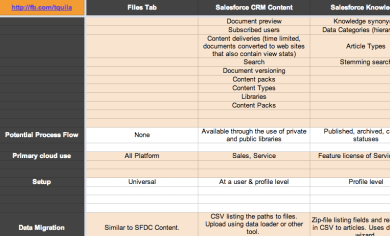 Choosing the right file or document management system on- (or off-) platform can be a difficult decision, and one of those things that’s difficult to change once implemented so it’s important to make the right choice up front.
Salesforce.com has a number of content and document solutions (and more on the way) and the options when given a set of decision points aren’t always clear. To this end I’ve created a matrix comparing the on-platform systems which should make that decision easier. It’s based on the official documentation but add in a few other key decision points (please don’t sue me Salesforce, I’m just a lowly a certified technical architect!).
If I’ve got anything wrong, or left something out please let me know.
 The Silver Lining